The KYC Compliance Fake
- Richard Stocks
- Jul 21
- 2 min read

Flggd Scam School · Bank & Financial Institution Scams · Lesson 12 of 16
An official-sounding email cites KYC rules and gives you 72 hours to verify your details. Here is how to tell a fake KYC verification email from anything your bank would send.
The message looks like this
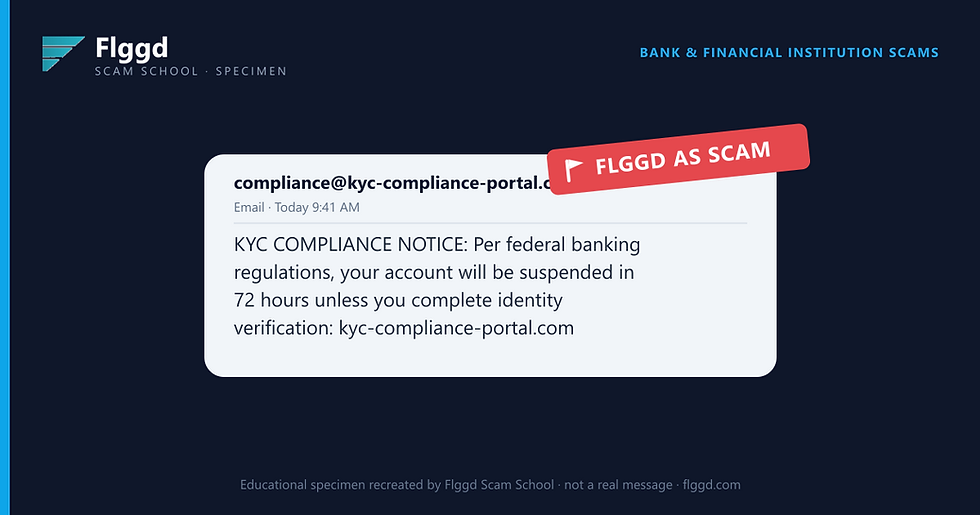
Why this is a scam
KYC, "Know Your Customer", is real; banks do it when you open an account or make unusual transactions. Scammers borrow the acronym because it sounds official and most people have never seen a genuine KYC request.
A real one never arrives as a countdown email pointing to a third-party "portal." It comes through your bank's own app or a letter, tied to a specific action you took, and it never threatens blanket suspension of an account in good standing.
The scammer's portal collects the full kit: ID photo, SSN, address, and sometimes a selfie holding your license. That's everything needed to impersonate you anywhere.
Red flags checklist
A "compliance portal" domain that isn't your bank's website.
ALL-CAPS urgency and a 72-hour suspension threat.
Regulation cited without any specific rule, case, or account reference.
A request for an ID photo or selfie through an email link.
No matching notice in your bank's app or secure message center.
The manipulation tactic
Jargon as authority. An acronym you half-recognize makes the demand feel like law rather than theft.
What to do, and what not to do
Don't click the portal link or upload anything.
Check your bank's app and secure messages for any real requirement.
Call the number on the back of your card to confirm.
Report the email as phishing, then delete it.
Never send ID photos through links that arrive by email.
Not sure about a message you've received? Check it in seconds with the free Flggd app.


