How Flggd works

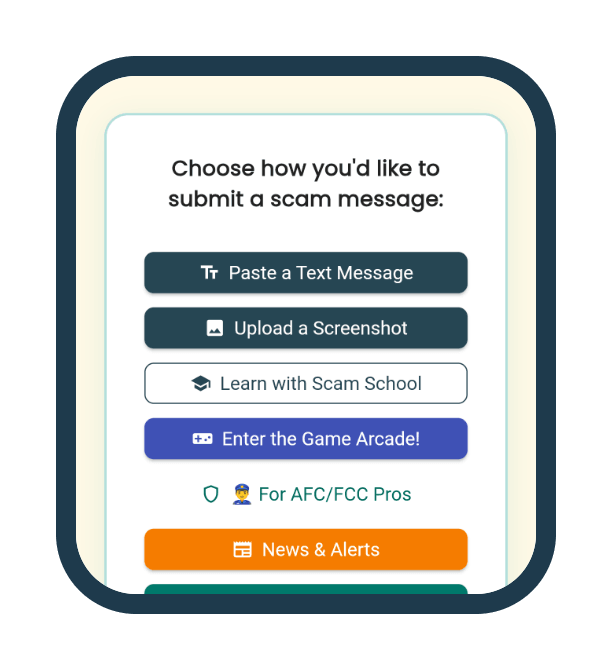
  1. The Flggd app's home screen on a phone: Choose how you'd like to submit a scam message, with buttons for Paste a Text Message and Upload a Screenshot.

    Step 1

    Paste it

    Paste the message, or add a screenshot of it.
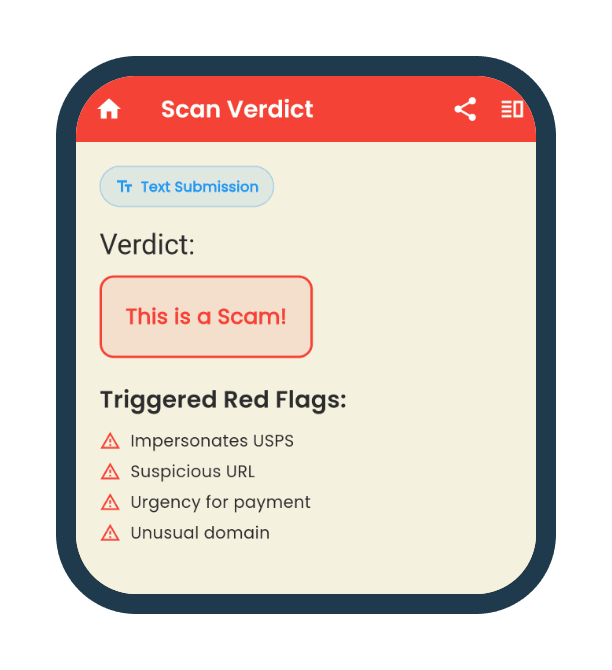
  2. The app's verdict screen: This is a Scam! Triggered red flags: Impersonates USPS, Suspicious URL, Urgency for payment, Unusual domain.

    Step 2

    Get the verdict

    Flggd weighs the whole message and says how confident it is, with the red flags it found.
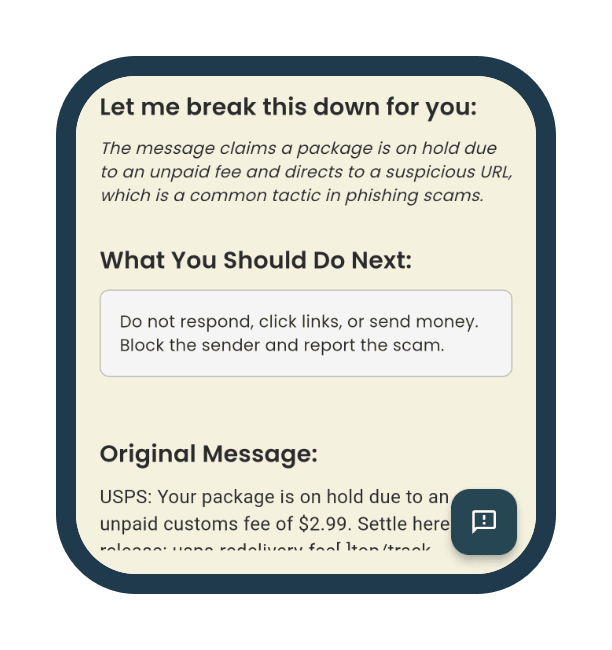
  3. Lower on the same screen: Let me break this down for you, the explanation, and What You Should Do Next: Do not respond, click links, or send money. Block the sender and report the scam.

    Step 3

    Know what to do next

    Every verdict ends with the next step to take.

Choose a sample message to see the verdict Flggd gave it.

Example

A real Flggd verdict, recorded earlier. Nothing is checked live here.

F

Flggd Verdict

Text Submission

Flggd Verdict

Scam

Red flag

High confidence of a scam. The content, the sender, the intent and where its requests lead all point the same way. Do not reply, click, call or pay.

Why Flggd says this

  • Urgency to call a number
  • Threat of viruses
  • Impersonation of Windows Support
  • Generic error code
  • What this message wants you to do

    The message uses scare tactics and impersonates Windows Support to prompt immediate action, which is a common scam strategy.

    What to do next

    Do not reply, click any link, call any number in the message or send money. If it claims to be from an organisation you know, contact them using details you already trust.

    Your message

    WINDOWS SECURITY ALERT: 5 viruses detected. Your banking passwords and photos are at risk. Do not shut down your computer. Call Windows Support immediately at 1-844-555-0184. Error code: 0x80073D2A.

    Example

    A real Flggd verdict, recorded earlier. Nothing is checked live here.

    F

    Flggd Verdict

    Text Submission

    Flggd Verdict

    Scam

    Red flag

    High confidence of a scam. The content, the sender, the intent and where its requests lead all point the same way. Do not reply, click, call or pay.

    Why Flggd says this

  • Impersonates USPS
  • Suspicious URL
  • Urgency for payment
  • Unusual domain
  • What this message wants you to do

    The message claims a package is on hold due to an unpaid fee and directs to a suspicious URL, which is a common tactic in phishing scams.

    What to do next

    Do not reply, click any link, call any number in the message or send money. If it claims to be from an organisation you know, contact them using details you already trust.

    Your message

    USPS: Your package is on hold due to an unpaid customs fee of $2.99. Settle here to release: usps-redelivery-fee[.]top/track

    Choose a flag to see what it means and what to do next. Press Esc to close it.

    Scam

    Red flag

    High confidence of a scam. The content, the sender, the intent and where its requests lead all point the same way. Do not reply, click, call or pay.

    What to do next

    Do not reply, click any link, call any number in the message or send money. If it claims to be from an organisation you know, contact them using details you already trust.

    Likely to be a scam

    Yellow flag

    It asks you to act: a link, a number, a reply or a payment. Where that request leads is where the harm starts.

    What to do next

    Do not reply, click any link, call any number in the message or send money. If it claims to be from an organisation you know, contact them using details you already trust.

    Likely to be a scam

    Grey flag

    Nothing is asked of you yet. The content, the sender or the intent do not add up. Scams like this start friendly and ask later.

    What to do next

    Do not reply at all, not even to say wrong number. A reply tells them the number is live. Block the sender and delete the message. If a request follows, check it again.

    Looks normal

    Green flag

    High confidence this is normal. The content reads as expected, the sender has a safe history, and anything it asks leads somewhere legitimate. Accounts can be taken over, so if a request seems out of character, check again.

    What to do next

    No action needed. If the sender later asks for money, codes or personal details, check that message too.

    What happens when you check a message. Flggd reads the whole message: what it says, who sent it, what it is trying to achieve, what it asks you to do and where that leads. It compares all of that with the scams it already knows, then grades how confident it is. The answer is one of four verdicts: Red flag, Yellow flag, Grey flag or Green flag, each with the reasons behind it and what to do next.

    The library. Every verdict is backed by a library of documented scams, organised by scam type and by the tactics scammers use. When a message looks like a known scam, Flggd shows you the closest one so you can read how it works.

    What the app adds. The app does the same check on your phone, keeps a history, teaches the warning signs, and can check your email for you.

    What Flggd does not claim. Flggd does not catch every scam, and no service does. A verdict is an assessment, not a guarantee: a message Flggd does not flag may still be a scam. Flggd cannot recover money that has already been sent. If money has moved, call your bank first.


    Every example on this page is a real scam, recreated by Flggd
    How we decide what is a scam